Small Things with Love

In this life we cannot always do great things. But we can do small things with great love. (Mother Theresa)

Life Is Short

Life is short. There is no time to leave important words unsaid. (Paulo Coelho)

Giving and Receiving

Blessed are those that can give without remembering and receive without forgetting. (Author Unknown)

Appreciate Yours

Be thankful for what you have you'll end up having more. If you concentrate on what you don't have, you will never, ever have enough.(Oprah Winfrey)

Something More

If you want something you’ve never had, you must be willing to do something you’ve never done. (Thomas Jefferson)

Wednesday, March 21, 2012

Nyepi "Day of Silence"


Nyepi is a Balinese "Day of Silence" that is commemorated every Isakawarsa (Saka new year) according to Bali's calendar (in 2012, it will be on March 23rd). It is a day of silence, fasting, and meditation. The day following Nyepi is also celebrated as New year.


Observed from 6 a.m. until 6 a.m. the next morning, Nyepi is a day reserved for self-reflection and as such, anything that might interfere with that purpose is restricted. The main restrictions are: no lighting fires (and lights must be kept low); no working; no entertainment or pleasure; no traveling; and for some, no talking or eating at all. The effect of these prohibitions is that Bali’s usually bustling streets and roads are empty, there is little or no noise from TVs and radios, and few signs of activity are seen even inside homes. The only people to be seen outdoors are the Pecalang, traditional security men who patrol the streets to ensure the prohibitions are being followed.

Although Nyepi is primarily a Hindu holiday, non-Hindu residents of Bali observe the day of silence as well, out of respect for their fellow citizens. Even tourists are not exempt; although free to do as they wish inside their hotels, no one is allowed onto the beaches or streets, and the only airport in Bali remains closed for the entire day. The only exceptions granted are for emergency vehicles carrying those with life-threatening conditions and women about to give birth.

On the day after Nyepi, known as Ngembak Geni, social activity picks up again quickly, as families and friends gather to ask forgiveness from one another, and to perform certain religious rituals together.


Rituals

  • First, The Melasti Ritual is performed at the 3-4 previous day. It is dedicated to Sanghyang Widhi Wasa and is performed at the beach to respect them as the owner of The Land and Sea. The ritual performed in Pura (Balinese temple) near the sea (Pura Segara) and meant to purify Arca, Pratima, and Pralingga (sacred objects) belongs to several temples, also to acquire sacred water from the sea.
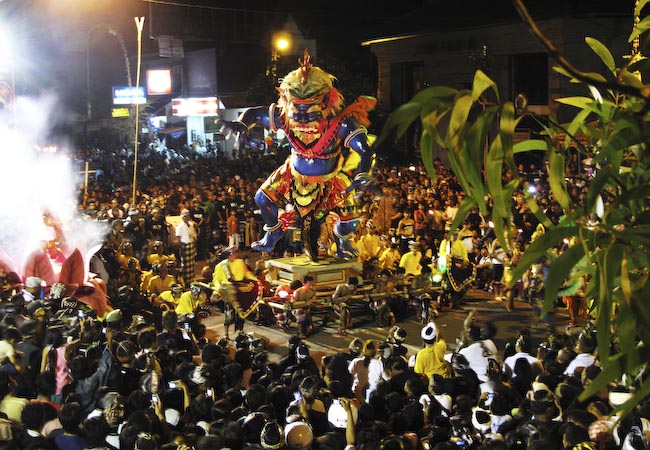
  • Second, The Bhuta Yajna Ritual is performed in order to vanquish the negative elements and create balance with God, Mankind, and Nature. The ritual also meant to appease Batara Kala by Pecaruan offering. Devout Hindu Balinese villages usually make ogoh-ogoh, demonic statues made of bamboo and paper symbolizing negative elements or malevolent spirits. After the ogoh-ogoh have been paraded around the village, the Ngrupuk ritual takes place, which involves burning the ogoh-ogoh.
  • Third, The Nyepi Rituals is performed with the following conditions:
    • Amati Geni: No fire/light, including no electricity
    • Amati Karya: No working
    • Amati Lelunganan: No travelling
    • Amati Lelanguan: Fasting and no revelry/self-entertainment
  • Fourth, The Yoga/Brata Ritual starts at 6:00 AM and continues to 6:00 AM the next day.
  • Fifth, The Ngembak Agni/Labuh Brata Ritual is performed for all Hindus to forgive each other and to welcome the new days to come.
  • Sixth and finally, The Dharma Shanti Rituals is performed as the Nyepi Day or "Day of Silence."
Now, Nyepi will be on 23 March 2012 in Bali

Rahajeng Rahina Nyepi Tahun Baru Caka 1934

Thursday, March 15, 2012

10 Keunggulan Windows Phone 7.5 Mango


Kini Windows Phone sudah mencapai update 7.5 yang diberi kode nama buah, Mango. Berikut kami hadirkan 10 fitur Windows Phone 7.5 yang menarik.

1. Antarmuka
Microsoft mengandalkan Metro UI sebagai user interface atau antarmuka ponsel yang mengadopsi Windows Phone 7.5 atau Mango. Layar utamanya mengandalkan kumpulan kotak yang dapat diganti isinya; misalnya dengan aplikasi, update cuaca, update berita, kontak, atau RSS feed.
Begitu jumlah aplikasi yang ter-install cukup banyak sehingga membutuhkan banyak layar, akan ada deretan alfabet muncul di menu aplikasi. Mekanismenya mirip seperti mencari nama orang di phonebook sehingga memudahkan pencarian aplikasi. Konsep antarmuka Mango ini lebih mengarah ke “glance and go”, yang pada dasarnya membuat penggunanya bisa mendapatkan informasi yang dibutuhkan hanya dengan sekali lirik.

2. Bing
Ibarat Android yang melekat dengan mesin pencari Google, maka seperti itulah antara Windows Phone dengan Bing. Mesin pencari yang belum begitu populer di Indonesia ini memiliki beberapa fitur seperti Local Scout (Pandu Lokal) yang akan memudahkan Anda dalam mencari restoran, peristiwa dan acara yang berlangsung di sekitar Anda berdasarkan lokasi ponsel.
Bagi pecinta musik, kombinasi Bing dan Windows Phone 7.5 cukup mengagumkan. Kini Anda bisa meminta Bing untuk mendengarkan musik yang Anda dengar. Kemudian Bing akan mencari segala informasi terkait dengannya serta tautan ke Zune di Marketplace.
Kemudian ada fitur Vision. Dengan  fitur ini, Anda dapat memindai teks dan Bing akan menawarkan Anda untuk mencari atau menerjemahkan teks tersebut. Selain itu, layaknya Google Googles, Vision dapat mencari informasi berdasarkan gambar. Bahkan Anda bisa membandingkan harga jual suatu buku dengan hanya memotret sisi depan atau belakangnya dengan toko buku lain!

3. What’s New Account Filter
Selain integrasi dengan Facebook, Mango kini juga dapat terhubung ke Twitter dan LinkedIn. Dengan banyaknya kontak yang terdapat di akun jejaring sosial kita, area What’s New pada People Hub bisa menjadi tempat update status dan postingan di Wall yang tak akan pernah habis.
Nah, fitur People Groups bisa membantu Anda untuk memilih daftar orang tertentu untuk ditampilkan. Jadi Anda bisa mengelompokkan update status dari teman kantor dalam satu grup terpisah sehingga tidak perlu menghabiskan waktu menyeleksi secara manual. Untuk What’s New, Anda dapat menambahkan pilihan update hanya dari jejaring sosial tertentu, misalnya dari Facebook saja.
4. Chat
Integrasi dengan Facebook di atas juga membawa kabar baik bagi sektor Messaging. Kini dengan Mango Anda dapat langsung chatting menggunakan Facebook Chat langsung di menu pesan. Microsoft menyatukan semua cara ngobrol dalam satu menu. Jadi misalnya Anda sedang asyik ngobrol dengan Facebook chat, lalu lawan bicara Anda beralih ke SMS, Anda tidak perlu beralih ke aplikasi lain. Semua obrolan akan diteruskan dalam satu thread dengan otomatis.

5. Speech
Kadang lebih mudah berbicara ketimbang mengetik, terutama di situasi tertentu seperti menyetir, memasak atau bahkan saat mengantuk. Voice support di Windows Phone memungkinkan Anda untuk mendiktekan pesan yang ingin dikirim dengan hanya memilih tombol Speak. Mango juga dapat membaca pesan masuk dengan cukup lantang.

6. Linked Inboxes
Fitur inbox email biasanya sering terlewatkan. Microsoft memberikan Anda kemampuan untuk mengatur dan mengelompokkan email yang masuk. Anda bisa menyatukan semua email dalam satu inbox atau memisahkannya berdasarkan kebutuhan Anda. Misalnya: Anda tinggal menghubungkan beberapa email dari rekan kerja untuk masuk dalam satu inbox khusus.

7. Custom Ringtones
Akhirnya, Anda kini dapat membuat personalisasi nada dering Anda sendiri. Caranya pun semudah Anda memasukkan lagu ke client software Zune. Selama nada dering itu berfile MP3 atau WMA, kurang dari 40  detik dan/atau 1MB, tak akan ada masalah.

8. Battery Saver
Microsoft telah melakukan sesuatu yang hebat pada fungsi penghemat daya ini: Anda dapat memilih opsi untuk tetap menggunakan fitur-fitur ponsel meski baterai ponsel dalam keadaan lemah, atau diaktifkan setelah pengisian berikutnya. Battery saver akan menonaktifkan fitur Push Email dan Multitasking. Pada dasarnya, fitur ini memberikan keseimbangan antara fungsionalitas ponsel sambil mencoba memberikan daya tahan baterai yang maksimal.

9. App Connect & Marketplace
Dengan App Connect, Anda akan mendapatkan informasi mengenai aplikasi yang relevan dengan hasil pencarian web Anda. Misalnya, Anda sedang mencari tentang film, maka selain hasil pencarian di browser, akan muncul beberapa aplikasi yang berkaitan dengan film. Cukup klik di link tersebut dan Anda akan dibawa ke Marketplace. Seperti namanya, di sinilah tempat Anda berbelanja aplikasi. Untuk versi terbaru, pengelompokan kategori aplikasi lebih jelas dan menemukan aplikasi yang bagus lebih mudah.

10. Find My Phone
Smartphone Windows Phone Anda hilang? Daripada bersedih, lebih baik lacak saja keberadaannya dengan fitur ini. Find My Phone akan memberikan Anda peta yang menunjukkan tempat terakhir di mana ponsel Anda berada, dan dapat Anda atur agar ia terkunci atau justru berdering (jika posisi terakhir ia dalam posisi hening) sehingga proses pelacakan akan semakin mudah. Siapa tahu ternyata ponsel Anda hanya terselip di bawah bantal.

Cara Membuat Takoyaki


Bahan:
300 gr tepung tako (kl gak ada terigu + baking powder)
2 butir telur
700 ml air
100 gr sayuran (kol, wortel)
150 gr tako (kl gak ada ganti cumi)
tenkatsu (=tempura scraps)


Taburan:
nori biru
katsuoboshi (toping-nya; berbentuk parutan skipjack tuna)
daun bawang diiris kecil

Saus:
saus tako
mayonaise

Cara:
1. Campur semua bahan kecuali tako dan tenkatsu, aduk sampai licin.
2. Panaskan cetakan, olesi minyak, tuang adonan, taburi tako. Sesudah berkulit taburi tenkatsu dan balik -balik sampai membentuk bola dan matang. Lakukan sampai adonan habis
3. Penyajian: Tata tako, oles saos tako, taburi nori, beri mayonaise, taburi katsuoboshi dan daun bawang.
Nikmati hangat-hangat.

Sunday, March 4, 2012

Windows 8 "Consumer Preview"


Taking a moment of technological event Mobile World Congress (MWC) 2012, Microsoft released a version of "Consumer Preview" of the newest operating system, Windows 8.
"This is an even better Windows than Windows 7," said Steven Sinofsky, the head of Microsoft's Windows division, while showing off Windows 8 in the MWC event held in Barcelona, ​​Spain.
Windows 7 is Microsoft's operating system which has the fastest-selling record, sold over 525 million units in less than three years.
However, Microsoft has been left behind in a race conscious mobile computing than Apple, Google, and Amazon.com. Microsoft Windows 8 be the answer in the catch.
"It's very fast and flowing in navigating this interface," said Sinofsky, as demonstrated Windows 8 on the tablet and ultrabook.
Windows 8 Consumer Preview or can we call a beta version of Windows 8 can be used by the public free of charge until the final version is available.
However, because it is still testing, Microsoft does not guarantee any programs or computational processes can be run well.
To use it, please download first the installer file from this page, http://preview.windows.com/.
Windows 8 Consumer Preview, by Stefen Sinofsky, brought more than 100,000 changes or improvements over version of the Developer Preview.
Microsoft previously released a Developer Preview version of Windows 8 at the end of 2011 last year and has been downloaded more than three million times.
Microsoft called Windows 8 as the most significant redesign of the Windows interface, since they present a Windows 95.
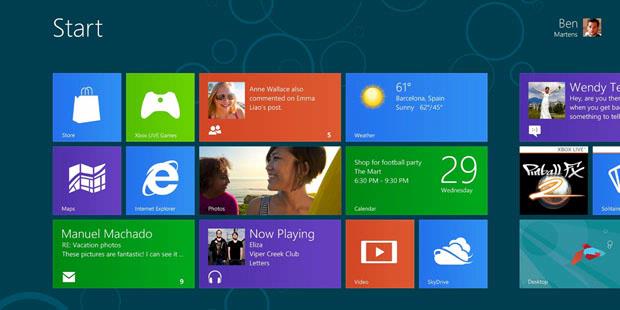
The emphasis of the new design is at the interface of Windows 8 "Metro style" which refers to the interface used in current Windows Phone platform.
For the first time, the famous Windows "Start" is not used anymore and will be replaced by a menu-based panel sliding (sliding panel-based menu).
In Windows 8, Microsoft is trying to combine the look and experience of the use of smartphones, tablet, and desktop computers.
This is a similar approach made a major competitor Microsoft, Apple and Google.
Unlike previous Windows versions that support only the x86 processor architecture, Windows 8 also supports the ARM chip that is widely used in tablet devices generally.
Users of Windows 8 will be a lot using the shear (sliding) to access the menus or applications.
However, Microsoft will still use the traditional Windows layout (by combining with sliding method) for the convenience of users in using applications, such as Word and Excel.


Windows Store
For the first time, Windows 8 will be completed store application "Windows Store" which provides a wide range of applications.
Store in Windows, users can download and try applications as well as gaining access to cloud storage (cloud storage) with the ability to move content on a variety of devices including mobile phones Windows Phone.
Windows Store has a wide range of applications and games, one of which has been known is the Cut the Rope.
Users need to login to the Microsoft account to download the application, all of which are free during this trial.
Windows 8 Consumer Preview also includes a beta version of Microsoft's latest browser, Internet Explorer 10.
Windows 8 has been found in email applications, calendaring and messaging, but there is no appearance of Office programs.
Sinofsky said earlier this March that the Office will be included in Windows 8 for ARM-based tablet.


source:kompas.com

DOWNLOAD WINDOWS 8 CP

Thursday, March 1, 2012

Kelebihan Google Plus Dibanding facebook


Google sebagai raksasa search engine telah meluncurkan layanan semacam jejaring sosial dengan nama google plus. Tentu saja layanan yang tergolong baru ini diprediksi banyak pihak untuk menyaingi kejayaan facebook di ranah social networking website. Apa saja kelebihan google plus dibanding facebook sehingga google berani bermain di jejaring sosial. Simak ulasan berikut:


1. Integrasi dengan layanan Google
Porsi terbesar yang dimiliki Google untuk menarik orang menggunakan Google+ ialah integrasi. Artinya Google akan membangun fitur dan peralatan Google+ ke hampir semua layanan online-nya mulai dari pencarian dokumen hingga Video. Google+ sudah diintegrasikan ke hampir keseluruhan produk Google.
Ini memperkenankan Anda memonitor semua peristiwa Google+ (pesan, update, dan lain-lain) sewaktu membagi konten dengan teman tanpa meninggalkan layanan Google yang sedang Anda gunakan. Jutaan orang menggunakan layanan gratis Google (Gmail, Dokumen, Pencarian, dll.), dan dengan keterikatan layanan tersebut dengan Google+ mungkin akan mudah bagi seseorang meninggalkan Facebook.


2. Manajemen pertemanan yang lebih baik
Google benar bahwa konsep “lingkaran” atau Circle lebih sesuai dengan cara kita berteman di kehidupan nyata. Kita memiliki banyak jenis teman, dan kita berinteraksi dan berkomunikasi dengan mereka dalam berbagai cara yang berbeda. Fitur Grup Facebook memperkenankan anda membentuk grup khusus teman, tapi dibandingkan dengan yang dilakukan di Google+, itu nampaknya tidak praktis. Lagi pula, Fitur Grup Facebook masih baru (tambahan), sedangkan Circle merupakan landasan dari platform Google+.

3. Aplikasi mobile yang lebih baik
Jika Anda adalah pengguna Android, anda bisa tahu bahwa memperoleh konten dari telepon Anda ke platform sosial lebih gampang, lebih bersih, lebih banyak fungsi dengan aplikasi mobile Google+. Aplikasi tersebut memang sudah mantap, tapi Google akan tetap mencari dan mencari cara untuk membuat Android anda menjadi anggota tubuh dari platform sosial Google+ anda. Google berharap untuk menggunakan basis pengguna Android-nya yang besar sebagai suatu bagian melawan Facebook, yang aplikasi mobile-nya walau kelihatan cantik tapi sedikit kikuk untuk digunakan.

4. Lebih gampang menemukan hal untuk dibagi
Fitur Spark Google+ merupakan satu lagi hal penting yang membedakannya dari Facebook. Spark ialah di mana Google mengungkit mesin pencarinya untuk melakukan sesuatu yang tidak dapat dilakukan Facebook yaitu memberikan pengguna aliran informasi instan yang relevan untuk dibagi bersama teman. Lantaran Facebook tidak memiliki mesin pencari, penggunanya harus meninggalkan situs itu untuk mencari data yang dapat dibagi atau menunggu teman mereka membaginya dengan mereka. Pertanyaan “bagaimana saya mencari sesuatu untuk dibagi” secara langsung dijawab dengan Spark.

5. Anda dapat mengambil kembali data Anda
Facebook dikenal kurang handal menangani data pribadi. Misalnya Anda dipaksa untuk membuat bagian tertentu data pribadi anda tampil ke publik, dan sangat sulit untuk secara permanen menghapus profil Facebook Anda. Di lain pihak, Google membuatnya mungkin bagi Anda untuk mengambil semua data yang Anda tempatkan di Google+ lalu pergi. Hal ini dilakukan melalui perangkat Google+ yang disebut “Data Liberation”. Dengan hanya beberapa klik anda dapat mengunduh data dari Picasa Web Albums anda, Profil Google, Google+ stream, Buzz dan kontak.

6. Melabel foto lebih baik
Ketika melihat foto di Google+ anda dapat melabel nama orang-orang di dalamnya mirip dengan di Facebook. Anda membuat persegi empat kecil di sekitar wajah mereka, kemudian mengetikkan nama mereka pada kotak di bawahnya atau memilih salah satu nama yang diterka Google+. Namun ada perbedaan besar di mana Google menangani aspek privasi dalam melabel foto. Ketika Anda melabel seseorang, akan ada catatan seperti ini “Menambahkan label ini akan memberitahukan orang yang anda labelkan. Mereka dapat foto dan album terkait”. Di lain pihak, Facebook tidak melakukan usaha untuk memperingatkan orang bahwa mereka telah dilabel (mungkin saja dalam foto yang tidak baik) dan memberikan mereka kesempatan langsung untuk mengeluarkan (remove) label itu.
Google juga telah memutuskan untuk sedikit malu menggunakan perangkat lunak pengenalan wajah, yang sekarang digunakan Facebook untuk secara otomatis mengidentifikasi orang dalam foto yang diunggah ke album pengguna.

7. Fitur obrolan grup yang mantap
Google+ memiliki fitur yang mengalahkan Facebook dalam urusan obrolan. Gampang untuk membuat grup khusus obrolan vidio dengan menggunakan fitur Hangouts pada Google+, dan membuat grup khusus untuk mengobrol nampaknya merupakan sesuatu yang alami dan menyenangkan untuk dilakukan dalam jejaring sosial. Hal yang mirip juga dilakukan oleh aplikasi mobile Huddle yang membuat pengguna Android memulai obrolan teks grup. Facebook tidak menawarkan perangkat ini.

8. Membagi konten lebih aman
Anjuran privasi sudah lama meminta situs jejaring sosial untuk memperkenankan pengguna menentukan tingkat privasi setiap konten yang dibagi, daripada menggunakan daftar penyetelan awal yang menentukan semua konten yang dibagi. Google nampaknya mendengar permintaan itu, dan membangun kapabilitas tersebut ke dalam Google+. Sebagai contoh, jika saya membagikan artikel atau mengunggah gambar dari kamera, Google+ memberikan saya pilihan lingkaran teman mana yang ingin saya bagikan konten tersebut. itu merupakan keuntungan Google+.

9. Google lebih baik mengurusi data pribadi Anda
Menjalankan sebuah jejaring sosial, semuanya tentang tanggung jawab untuk mengurusi informasi pribadi pengguna. Facebook merupakan perusahaan muda yang bergerak cepat yang telah terbukti angkuh dalam pergerakannya, kurang begitu peduli kepada privasi data pengguna, dan mudah diakses orang lain. Di lain pihak, Google merupakan perusahaan yang jauh lebih matang yang terlihat jauh lebih terpercaya ketimbang Facebook. Sebagian besarnya, Google telah beroperasi berdasarkan slogannya “Jangan Menjadi Jahat”.

How to Change Windows 7 Boot Screen Using Windows 7 Boot Updater

NOTE: This tool is intended for highly experienced users. Please do NOT try it if you are not familiar with such kind of customization stuffs. We'll not be responsible if you break your system with this tool. So use it at your own risk!
Now the wait is over. Since when Microsoft released Windows 7, no one was able to change the boot screen as it requires lots of files and certificates hacks.
But now Jeff Bush @ "Coder for life" website has developed an excellent tool which can customize Windows 7 boot screen.
"Windows 7 Boot Updater" is a program that makes it easy to update the Windows 7 boot animation and text. It is written in C++/CLI and requires Microsoft .NET Framework 2.0 and the Microsoft WIM library.

Windows_7_Boot_Updater.png 

Features List:
  • Modifies the boot animation
  • Modifies the boot text "Starting Windows" and "Microsoft Corporation"
  • Will compile the animation from 105 BMP, PNG, GIF, or TIFF images
  • Does not require any other applications (like ImageX)
  • Designed to be idiot-proof by having numerous checks
  • Automatically backs up the modified files
  • Works for all versions of Windows 7: any language, any edition, 32-bit or 64-bit
  • Works even if your setup has the hidden "System Reserved" partition
The software is available for both 32-bit and 64-bit versions.
HOW TO USE:
You can change both boot screen and resume screen using this utility.
1. Download and run the program's exe file.
2. You can change the text messages, remove them completely, change their color. You can also replace animation and background image.
3. If you want to change the animation you will have to make an animation! The animation is:
  • 105 frames (if there are less frames the last frame will be repeated as necessary)
  • Each frame is 200x200px (resized if necessary)
  • 15 frames / sec
  • First 4 seconds play once then the last 3 seconds play in a loop
The program loads a folder containing all the frames as PNGs, GIFs, BMPs, TIFs, or JPEGs images. The files will be played in alphabetical order. If you are numbering them, use the same number of digits for all numbers (e.g. 001, 002, ..., 103, 105). For 'historical' reasons, the animation can also be a folder containing a single BMP named "activity.bmp" that is 200x21000px.
HOW TO RESTORE:
If you get stuck forever in Windows Recovery Environment then you need to manually restore winload.exe. Here are the directions:
1. Once you enter Windows Recovery Environment press "Cancel" right away (while it is still scanning).
2. Click "Yes" on the warning that pops up.
3. Click "View advanced options for system recovery and support".
4. Select your keyboard types and click "Next".
5. Select an account (not "HomeGroupUser$") and enter password and click "OK".
6. Click "Command Prompt" (the last option) and enter following commands:
C:
cd \Windows\System32
del winload.exe
ren "winload~1.exe" winload.exe
exit
PS: Here C: in first line represents the system drive where Windows 7 is installed in your system. If you have installed Windows in any other partition like D: drive, then change the command to D:
7. Click "Restart" and you'll be able to boot into Windows again.

Wednesday, February 29, 2012

Seven Changes to Watch for in Ubuntu 12.04 'Precise Pangolin'

It was just a few weeks ago that planning began on Ubuntu 12.04, or “Precise Pangolin,” but already key details about the upcoming version of Canonical's popular Linux distribution are beginning to emerge.
ubuntu
A number of decisions about the new software were made at the Ubuntu Developer Summit last week. Ready for a rundown? Here's what we've learned so far.

1. Too Big for CDs
One of the more notable developments is that it looks like developers are planning to target a 750 MB ISO image for Ubuntu 12.04, meaning that the software will no longer fit on a CD, according to a report on The H. Instead, users will need either DVDs or USB drives to install it. The change may seem shocking, but it's actually an increase of only 50 MB.

2. Back to Rhythmbox?
Numerous reports are suggesting that the Banshee music player--which was only just recently added to Ubuntu--may be replaced by Rhythmbox once again. Problems cited with Banshee include poor maintenance and also potential incompatibilities with ARM, according to a post-Summit blog post by Banshee developer Joseph Michael Shields, who disputes both assertions. No final decision appears to have been made on this question, however, and it's currently being discussed in a thread on the Ubuntu-Desktop mailing list.

3. No More Mono?
Closely linked with the question of removing Banshee is the possibility of removing Mono from Ubuntu as well. Banshee is one of the few applications left in the software that still depend on Mono, which is an open source implementation of Microsoft's .NET framework. Ubuntu Community Manager Jono Bacon weighed in with a blog entry on Tuesday stressing that neither the Banshee nor the Mono decisions have been finalized.
 
4. 64-Bit by Default
Also notable in Ubuntu 12.04 is that users will be offered the 64-bit version by default, though the 32-bit version will still be available. Version 3.2 of the Linux kernel, meanwhile, will serve as the heart of Ubuntu 12.04, according to a report on Phoronix.

5. A Wayland Preview
While Ubuntu 12.04 will still depend on X.Org as its main server, an experimental Wayland preview running an X11 server may be available as well, Phoronix reports.

6. Some GNOME 3.4 Packages
The bulk of the GNOME packages in Ubuntu 12.04 LTS will be GNOME 3.2 packages, but a few GNOME 3.4 packages will reportedly be included as well, including GTK+ 3.4, GNOME Games, GEdit, Gcalctool, Evince, and Yelp.

7. A Speedier Software Center
Finally, developers hope to speed startup of the Ubuntu Software Center from 11 seconds to less than two seconds, according to The H.
Due in April, Ubuntu 12.04 will be a Long-Term Support (LTS) version of the free and open source operating system, with support for a full five years. I'll be watching closely as new details emerge.


click here for download Ubuntu 12.04
DOWNLOAD 

from: http://www.pcworld.com/businesscenter/article/243541/seven_changes_to_watch_for_in_ubuntu_1204_precise_pangolin.html

Wednesday, December 7, 2011

Spesifikasi iPhone 5

iPhone 5 Mungkin adalah salah satu gadget yang paling di tunggu orang saat ini, setelah kesuksesan yang di dapatkan dari iPhone 4, kini apple dikabarkan sudah merancang hadirnya iPhone generasi terbaru yang di beri nama iPhone 5, Harga iPhone 5 di Indonesia sendiri belum diketahui dengan pasti, akan tetapi bocoran mengenai spesifikasi Ipone 5 sendiri sudah banyak di publikasikan di internet, meskipun peluncuranya sendiri belum diketahui secara pasti.
iPhone 5 
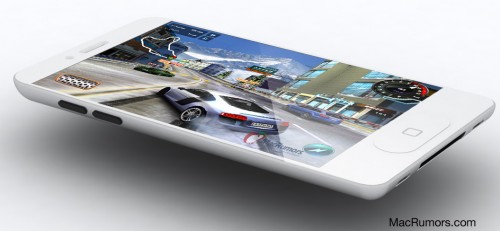
Bocoran mengenai Spesifikasi Iphone 5 sediri telah banyak di lansir oleh portal gadget semacam Mcrumors.com Salah satu Bocoran yang beredar cukup kuat adalah desain iPhone 5 yang beritakan adalah desainnya akan lebih lebar dan lebih tipis dari iPhone 4.

Sejumlah media online memberitakan bahwa casing untuk iPhone 5 mempunyai ukuran lebih lebar dan tipis dibandingkan dengan generasi sebelumnya. Salah satu "bocorannya" adalah casing yang sudah diproduksi secara massal dan membanjiri pasar China. Casing itu lebih lebar dan tipis serta tersedia dalam beragam warna dan material.

Berdasarkan desain casing yang beredar di pasaran china tersebut, menurut situs MicGadgdet, , memprediksikan bahwa iPhone 5 akan dibuat setipis iPod Touch akan tetapi layarnya di buat lebih tebal dan lebih lebar. Bahan casing bagian belakangnya akan terbuat dari aluminum seperti iPad 2.
https://blogger.googleusercontent.com/img/b/R29vZ2xl/AVvXsEjWg_841RfN27uI-JEtsbHgW6PsNi1yPzYlu-ZN8E9_O21moqy-8eu4_BIcXyBSdmKdo9S_d_RFKBweGPIFn83_rdzM6rUFAdOOQF4EnInxrk2bmqE-nrP-ITkDfq4UIpQVNVh7DHBVYuRl/s1600/iphone5-3-500x375.jpg

Foto iPhone 5

Masih menurut bocoran kali ini dari MacRumors memprediksikan dengan lebih detail. Dimana iPhone 5 akan berukuran 4,33 inci x 2,36 inci, sedikit lebih lebar, tetapi lebih pendek daripada iPhone 4 yang berdimensi 4,5 inci x 2,31 inci.
https://blogger.googleusercontent.com/img/b/R29vZ2xl/AVvXsEhmTtx57f2NgO6wvOyo99qLYJ3sZx_gSoVghWC3APjGxsyRwaGjKyW99xH5n5W23xu1yTlTBusYFUfxANtVpz2c2b6HlAfqFJvkdrEM4WrM2jAIbyEhjLcp3baieXu4mNjGW3vc7qL0z00D/s1600/iphone-5-casing.jpg

DESAIN IPHONE 5

Selain itu mcrumors juga memberitakan bahwa, iPhone 4 memiliki layar berukuran 3,5 inci (diagonal) dengan lebar 1,95 inci. Adapun iPhone 5 dengan lebar layar berdasarkan casing 2,24 inci akan memiliki ukuran diagonal layar paling tidak 4 inci. ketebalan iPhone 5 tak akan lebih dari 0,3 inci dan menipis menjadi 0,065 inci dari atas ke bawah.
https://blogger.googleusercontent.com/img/b/R29vZ2xl/AVvXsEjPya7CZ4l88vTC9BIN_MbDXo__Y1JbhT6yJ5oSoVCYVJqFJL7tDCzmU6jTwGz0v8PlUuYYlFu1qrCfOdCz7pyVecGZnQ6K1aZK_gX8YLSaUUrdVnYACeIyqOW3gx1RacSl_YTnWbHCH_tO/s1600/iphone5-11-500x231.jpg
Untuk spesifikasi dan harga iPhone 5 yang pasti kita tunggu saja peluncuranya di Indonesia

Wednesday, November 30, 2011

About Waterfox


Currently Firefox 64-bit is still under development (though testing build available, stable version might be available with Firefox 8 release for Windows 64-bit systems), wait! you can taste Waterfox which 64-bit version of Firefox which is compiled from Firefox source code runs fast on 64-bit Windows, developer claims 64-bit version is more responsive, quicker and out-performs 32-bit version.
Waterfox vs. Firefox & Waterfox features
  • The add-ons for Firefox will work with this Firefox version too.
  • Supports auto-updates, you won’t need to manually check for updates.
  • Compiled with SSE, SSE2, x64 favoring enabled.
  • You can install both Firefox and Waterfox in your Computer without any problems, however you may not use them at the same time since Waterfox uses Firefox profile.
  • You’ll have to wait for Waterfox when Official Mozilla Firefox is released as it needs to be recompiled into Waterfox
  • You must’ve Visual C++ redistributable installed.
You can download 64-bit version of plug-ins like Adobe Flash Player, Microsoft Silverlight, Java from here.
Download Waterfox

Tuesday, November 22, 2011

Android 4.0 (Ice Cream Sandwich)


source: http://android.com/

Introducing Android 4.0

Android 4.0 (Ice Cream Sandwich) is the latest version of the Android platform for phones, tablets, and more. It builds on the things people love most about Android — easy multitasking, rich notifications, customizable home screens, resizable widgets, and deep interactivity — and adds powerful new ways of communicating and sharing.

Simple, Beautiful, Useful

Refined, evolved UI

Focused on bringing the power of Android to the surface, Android 4.0 makes common actions more visible and lets you navigate with simple, intuitive gestures. Refined animations and feedback throughout the system make interactions engaging and interesting. An entirely new typeface optimized for high-resolution screens improves readability and brings a polished, modern feel to the user interface.
Virtual buttons in the System Bar let you navigate instantly to Back, Home, and Recent Apps. The System Bar and virtual buttons are present across all apps, but can be dimmed by applications for full-screen viewing. You can access each application's contextual options in the Action Bar, displayed at the top (and sometimes also at the bottom) of the screen.
Multitasking is a key strength of Android and it's made even easier and more visual on Android 4.0. The Recent Apps button lets you jump instantly from one task to another using the list in the System Bar. The list pops up to show thumbnail images of apps used recently — tapping a thumbnail switches to the app.

The Recent Apps list makes multitasking simple.

Jump to the camera or see notifications without unlocking.

For incoming calls, you can respond instantly by text.
Rich and interactive notifications let you keep in constant touch with incoming messages, play music tracks, see real-time updates from apps, and much more. On smaller-screen devices, notifications appear at the top of the screen, while on larger-screen devices they appear in the System Bar.

Home screen folders and favorites tray

New home screen folders offer a new way for you to group your apps and shortcuts logically, just by dragging one onto another. Also, in All Apps launcher, you can now simply drag an app to get information about it or immediately uninstall it, or disable a pre-installed app.

The All Apps launcher (left) and resizable widgets (right) give you apps and rich content from the home screen.
On smaller-screen devices, the home screen now includes a customizable favorites tray visible from all home screens. You can drag apps, shortcuts, folders, and other priority items in or out of the favorites tray for instant access from any home screen.

Resizable widgets

Home screens in Android 4.0 are designed to be content-rich and customizable. You can do much more than add shortcuts — you can embed live application content directly through interactive widgets. Widgets let you check email, flip through a calendar, play music, check social streams, and more — right from the home screen, without having to launch apps. Widgets are resizable, so you can expand them to show more content or shrink them to save space.

New lock screen actions

The lock screens now let you do more without unlocking. From the slide lock screen, you can jump directly to the camera for a picture or pull down the notifications window to check for messages. When listening to music, you can even manage music tracks and see album art.

Quick responses for incoming calls

When an incoming call arrives, you can now quickly respond by text message, without needing to pick up the call or unlock the device. On the incoming call screen, you simply slide a control to see a list of text responses and then tap to send and end the call. You can add your own responses and manage the list from the Settings app.

Swipe to dismiss notifications, tasks, and browser tabs

Android 4.0 makes managing notifications, recent apps, and browser tabs even easier. You can now dismiss individual notifications, apps from the Recent Apps list, and browser tabs with a simple swipe of a finger.

A spell-checker lets you find errors and fix them faster.

A powerful voice input engine lets you dictate continuously.

Improved text input and spell-checking

The soft keyboard in Android 4.0 makes text input even faster and more accurate. Error correction and word suggestion are improved through a new set of default dictionaries and more accurate heuristics for handling cases such as double-typed characters, skipped letters, and omitted spaces. Word suggestion is also improved and the suggestion strip is simplified to show only three words at a time.
To fix misspelled words more easily, Android 4.0 adds a spell-checker that locates and underlines errors and suggests replacement words. With one tap, you can choose from multiple spelling suggestions, delete a word, or add it to the dictionary. You can even tap to see replacement suggestions for words that are spelled correctly. For specialized features or additional languages, you can now download and install third-party dictionaries, spell-checkers, and other text services.

Powerful voice input engine

Android 4.0 introduces a powerful new voice input engine that offers a continuous "open microphone" experience and streaming voice recognition. The new voice input engine lets you dictate the text you want, for as long as you want, using the language you want. You can speak continously for a prolonged time, even pausing for intervals if needed, and dictate punctuation to create correct sentences. As the voice input engine enters text, it underlines possible dictation errors in gray. After dictating, you can tap the underlined words to quickly replace them from a list of suggestions.

Data usage controls let you monitor total usage by network type and application and then set limits if needed.

Control over network data

Mobile devices can make extensive use of network data for streaming content, synchronizing data, downloading apps, and more. To meet the needs of you with tiered or metered data plans, Android 4.0 adds new controls for managing network data usage.
In the Settings app, colorful charts show the total data usage on each network type (mobile or Wi-Fi), as well as amount of data used by each running application. Based on your data plan, you can optionally set warning levels or hard limits on data usage or disable mobile data altogether. You can also manage the background data used by individual applications as needed.

Designed for accessibility

A variety of new features greatly enhance the accessibility of Android 4.0 for blind or visually impaired users. Most important is a new explore-by-touch mode that lets you navigate without having to see the screen. Touching the screen once triggers audible feedback that identifies the UI component below; a second touch in the same component activates it with a full touch event. The new mode is especially important to support users on new devices that use virtual buttons in the System Bar, rather than dedicated hardware buttons or trackballs. Also, standard apps are updated to offer an improved accessibility experience. The Browser supports a script-based screen reader for reading favorite web content and navigating sites. For improved readability, you can also increase the default font size used across the system.
The accessibility experience begins at first setup — a simple touch gesture during setup (clockwise square from upper left) activates all accessibility features and loads a setup tutorial. Once accessibility features are active, everything visible on the screen can be spoken aloud by the standard screen reader.

Contacts and profiles are integrated across apps and social networks, for a consistent, personal experience everywhere — from incoming calls to emails.

Communication and sharing

People and profiles

Throughout the system, your social groups, profiles, and contacts are linked together and integrated for easy accessibility. At the center is a new People app that offers richer profile information, including a large profile picture, phone numbers, addresses and accounts, status updates, events, and a new button for connecting on integrated social networks.
Your contact information is stored in a new "Me" profile, allowing easier sharing with apps and people. All of your integrated contacts are displayed in an easy to manage list, including controls over which contacts are shown from any integrated account or social network. Wherever you navigate across the system, tapping a profile photo displays Quick Contacts, with large profile pictures, shortcuts to phone numbers, text messaging, and more.

Unified calendar, visual voicemail

To help organize appointments and events, an updated Calendar app brings together personal, work, school, and social agendas. With user permission, other applications can contribute events to the calendar and manage reminders, for an integrated view across multiple calendar providers. The app is redesigned to let you manage events more easily. Calendars are color-coded and you can swipe left or right to change dates and pinch to zoom in or out agendas.
In the phone app, a new visual voicemail features integrates incoming messages, voice transcriptions, and audio files from one or more providers. Third-party applications can integrate with the Phone app to add your own voice messages, transcriptions, and more to the visual voicemail inbox.

Capture the picture you want, edit, and share instantly.

Rich and versatile camera capabilities

The Camera app includes many new features that let you capture special moments with great photos and videos. After capturing images, you can edit and share them easily with friends.
When taking pictures, continuous focus, zero shutter lag exposure, and decreased shot-to-shot speed help capture clear, precise images. Stabilized image zoom lets you compose photos and video in the way you want, including while video is recording. For new flexibility and convenience while shooting video, you can now take snapshots at full video resolution just by tapping the screen as video continues to record.
To make it easier to take great pictures of people, built-in face detection locates faces in the frame and automatically sets focus. For more control, you can tap to focus anywhere in the preview image.
For capturing larger scenes, the Camera introduces a single-motion panorama mode. In this mode, you start an exposure and then slowly turn the Camera to encompass as wide a perspective as needed. The Camera assembles the full range of continuous imagery into a single panoramic photo.
After taking a picture or video, you can quickly share it by email, text message, bluetooth, social networks, and more, just by tapping the thumbnail in the camera controls.

A Photo Gallery widget on the home screen.

Redesigned Gallery app with photo editor

The Gallery app now makes it easier to manage, show, and share photos and videos. For managing collections, a redesigned album layout shows many more albums and offers larger thumbnails. There are many ways to sort albums, including by time, location, people, and tags. To help pictures look their best, the Gallery now includes a powerful photo editor. You can crop and rotate pictures, set levels, remove red eyes, add effects, and much more. After retouching, you can select one or multiple pictures or videos to share instantly over email, text messaging, bluetooth, social networks, or other apps.
An improved Picture Gallery widget lets you look at pictures directly on the home screen. The widget can display pictures from a selected album, shuffle pictures from all albums, or show a single image. After adding the widget to the home screen, you can flick through the photo stacks to locate the image you want, then tap to load it in Gallery.

Live Effects let you change backgrounds and use Silly Faces during video.

Live Effects for transforming video

Live Effects is a collection of graphical transformations that add interest and fun to videos captured in the Camera app. For example, you can change the background behind them to any stock or custom image, for just the right setting when shooting video. Also available for video is Silly Faces, a set of morphing effects that use state-of-the-art face recognition and GPU filters to transform facial features. For example, you can use effects such as small eyes, big mouth, big nose, face squeeze, and more. Outside of the Camera app, Live Effects is available during video chat in the Google Talk app.

Snapping a screenshot.

Sharing with screenshots

You can now share what's on your screens more easily by taking screenshots. Hardware buttons let them snap a screenshot and store it locally. Afterward, you can view, edit, and share the screen shot in Gallery or a similar app.

Cloud-connected experience

Android has always been cloud-connected, letting you browse the web and sync photos, apps, games, email, and contacts — wherever you are and across all of your devices. Android 4.0 adds new browsing and email capabilities to let you take even more with them and keep communication organized.

The Browser tabs menu (left) lets you quickly switch browser tabs. The options menu (right) gives you new ways to manage your browsing experience.

Benchmark comparisons of Android Browser.

Powerful web browsing

The Android Browser offers an experience that’s as rich and convenient as a desktop browser. It lets you instantly sync and manage Google Chrome bookmarks from all of your accounts, jump to your favorite content faster, and even save it for reading later in case there's no network available.
To get the most out of web content, you can now request full desktop versions of web sites, rather than their mobile versions. You can set your preference for web sites separately for each browser tab. For longer content, you can save a copy for offline reading. To find and open saved pages, you can browse a visual list that’s included with browser bookmarks and history. For better readability and accessibility, you can increase the browser’s zoom levels and override the system default text sizes.
Across all types of content, the Android Browser offers dramatically improved page rendering performance through updated versions of the WebKit core and the V8 Crankshaft compilation engine for JavaScript. In benchmarks run on a Nexus S device, the Android 4.0 browser showed an improvement of nearly 220% over the Android 2.3 browser in the V8 Benchmark Suite and more than 35% in the SunSpider 9.1 JavaScript Benchmark. When run on a Galaxy Nexus device, the Android 4.0 browser showed improvement of nearly 550% in the V8 benchmark and nearly 70% in the SunSpider benchmark.

Improved email

In Android 4.0, email is easier to send, read, and manage. For composing email, improved auto-completion of recipients helps with finding and adding frequent contacts more quickly. For easier input of frequent text, you can now create quick responses and store them in the app, then enter them from a convenient menu when composing. When replying to a message, you can now toggle the message to Reply All and Forward without changing screens.
For easier browsing across accounts and labels, the app adds an integrated menu of accounts and recent labels. To help you locate and organize IMAP and Exchange email, the Email app now supports nested mail subfolders, each with synchronization rules. You can also search across folders on the server, for faster results.
For enterprises, the Email app supports EAS v14. It supports EAS certificate authentication, provides ABQ strings for device type and mode, and allows automatic sync to be disabled while roaming. Administrators can also limit attachment size or disable attachments.
For keeping track of incoming email more easily, a resizable Email widget lets you flick through recent email right from the home screen, then jump into the Email app to compose or reply.

Android Beam lets you share what you are using with a single tap.

Innovation

Android is continuously driving innovation forward, pushing the boundaries of communication and sharing with new capabilities and interactions.

Android Beam for NFC-based sharing

Android Beam is an innovative, convenient feature for sharing across two NFC-enabled devices, It lets people instantly exchange favorite apps, contacts, music, videos — almost anything. It’s incredibly simple and convenient to use — there’s no menu to open, application to launch, or pairing needed. Just touch one Android-powered phone to another, then tap to send.
For sharing apps, Android Beam pushes a link to the app's details page in Android Market. On the other device, the Market app launches and loads the details page, for easy downloading of the app. Individual apps can build on Android Beam to add other types of interactions, such as passing game scores, initiating a multiplayer game or chat, and more.

Face recognition lets you unlock your phone with your face.

Face Unlock

Android 4.0 introduces a completely new approach to securing a device, making each person's device even more personal — Face Unlock is a new screen-lock option that lets you unlock your device with your face. It takes advantage of the device front-facing camera and state-of-the-art facial recognition technology to register a face during setup and then to recognize it again when unlocking the device. Just hold your device in front of your face to unlock, or use a backup PIN or pattern.

Wi-Fi Direct and Bluetooth HDP

Support for Wi-Fi Direct lets you connect directly to nearby peer devices over Wi-Fi, for more reliable, higher-speed communication. No internet connection or tethering is needed. Through third-party apps, you can connect to compatible devices to take advantage of new features such as instant sharing of files, photos, or other media; streaming video or audio from another device; or connecting to compatible printers or other devices.
Android 4.0 also introduces built-in support for connecting to Bluetooth Health Device Profile (HDP) devices. With support from third-party apps, you can connect to wireless medical devices and sensors in hospitals, fitness centers, homes, and elsewhere.

Cara Memasang Android OS di PC


bagi yang belum tahu – adalah jenis Operating system (OS) untuk jenis perangkat mobile berbasis Linux. Android menyediakan source code bagi developer untuk mengembangkan aplikasi yang digunakan dalam perangkat bergerak. Android secara normal hanya bisa dipakai untuk perangkat mobile/seluler. Terus, bagaimana kalau ingin mencoba menggunakan Android tapi kita tidak memiliki perangkat mobile khusus Android ? Berikut cara mencicipi Android ke dalam perangkat PC :

Metro-style Internet Explorer 10 ditches Flash, plugins


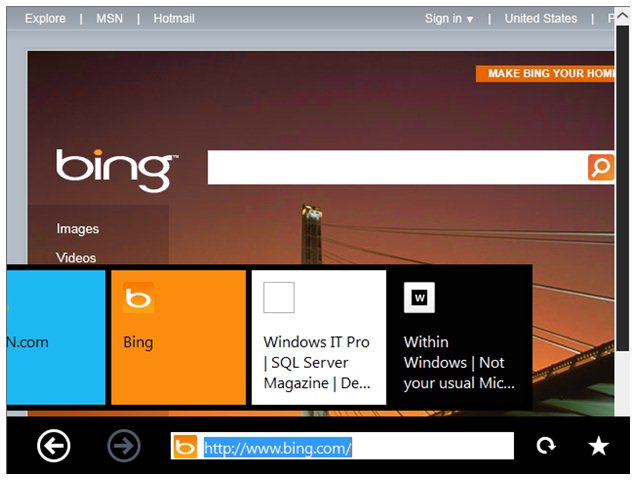
Windows 8 will have two versions of Internet Explorer 10: a conventional browser that lives on the legacy desktop, and a new Metro-style, touch-friendly browser that lives in the Metro world. The second of these, the Metro browser, will not support any plugins. Whether Flash, Silverlight, or some custom business app, sites that need plugins will only be accessible in the non-touch, desktop-based browser.
Should one ever come across a page that needs a plugin, the Metro browser has a button to go to that page within the desktop browser. This yanks you out of the Metro experience and places you on the traditional desktop.
The rationale is a familiar one: plugin-based content shortens battery life, and comes with security, reliability, and privacy problems. Sites that currently depend on the capabilities provided by Flash or Silverlight should switch to HTML5.
Microsoft has been vigorously promoting HTML5 for the last year and a half as the best way of providing rich interactivity on the Web. HTML5 potentially has reach far beyond that of Flash, since it can target both conventional browsers and closed ecosystems (such as iOS) alike. However, until now, Microsoft's messaging has been tempered somewhat: use HTML5 when you can, but if you can't—if you need support for DRM-protected media streaming, for example—then it's reasonable to switch to an alternative, plugin-based technology.
With Windows 8, however, those reasonable decisions to use Flash or Silverlight will now be heavily penalized. Technically, there's nothing wrong with the desktop browser, of course; the rendering engine and performance will be identical between both Metro and desktop. But the experience will be substantially inferior. The desktop browser isn't designed for touch inputs, meaning that users will either have to switch to a mouse and keyboard, or fumble around with an interface that wasn't built for fingers. The switch to the desktop browser also appears to discard things like back button history and current page state.
This puts the Metro browser in a peculiar position. Microsoft has positioned tablets as merely a different kind of PC. That, the company argues, affords capabilities and features not possible on iPad-style devices. But PCs have browser plugins—more generally, they have the ability to use the right technology for the job. If Metro doesn't include that flexibility, that could be seen as diminishing the "PCness" of the platform.
HTML5 still isn't a total replacement for plugin technologies, either. The gap is certainly narrowing: Web Sockets, Web Workers, built-in support for webcams and microphones, and more, are all coming to HTML5 browsers (or are available already), and these features will obviate the need for plugins for many applications. But certain corners are likely to remain; DRM-protected video, for example, might forever be impossible in HTML5, and while many people find DRM distasteful, many broadcasters feel they have little choice but to use it.
The solution to this conundrum on the iOS platform has been the app: companies like Netflix and the BBC have applications to watch video on these devices. The result is that in the desire to push an open, plugin-free Web, companies are being forced to migrate away from the Web entirely. Silverlight developers, at least, will have an easy migration path available to them: the new Metro development environment, used for producing native Metro applications, borrows heavily from Silverlight, and making the switch from an in-browser plugin-based application to a standalone Metro application should be relatively easier. Flash developers will have to wait to see what tools Adobe delivers.
HTML5 design and developer tools also remain weak, though this situation is improving with the creation of products like Adobe Edge.
With Microsoft's promotion of HTML5, and the precedent set by iOS, the decision to get rid of plugins in the Metro browser is perhaps unsurprising. But it's not clear that this will truly help Windows 8; the awkward user experience penalizes users who, for no fault of their own, need to use plugins, and detracts from Windows 8's PC claims. A switch to a more HTML5-powered Web will happen regardless

Thursday, October 13, 2011

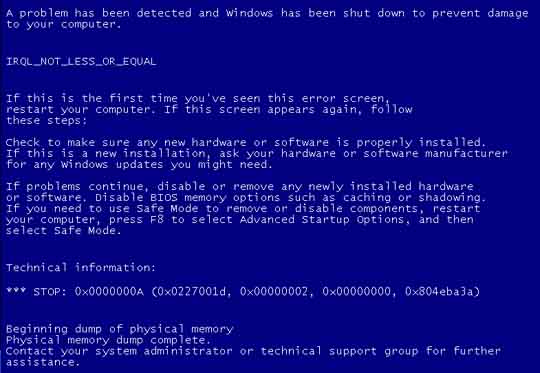
Blue Screen Dan Cara Mengatasinya

Apa Itu Blue Screen-BSOD?

Blue Screen Of Death – BSOD ( Layar Biru Kematian ), atau kadang disebut “layar biru” – Blue Screen adalah istilah populer untuk layar yang ditampilkan Microsoft Windows ketika mengalami kesalahan sistem ( atau disebut stop error oleh Microsoft ). BSOD milik Windows NT, 2000, XP, Vista, maupun Seven biasanya lebih serius daripada Windows sebelumnya. Ada beberapa hal yang menyebabkan munculnya BSOD ini. Diantaranya driver peralatan yang tidak bagus, kesalahan memori, registry yang rusak atau penggunaan file DLL yang tidak cocok. Berbagai bentuk BSOD terdapat pada seluruh sistem operasi Windows sejak Windows 3.1. BSOD merupakan pengganti black screen of death ( layar hitam kematian ) yang muncul pada OS/2 dan MS-DOS.Dalam versi awal dari Windows Vista juga terdapat red screen of death atau layar merah kematian, yang digunakan pada kesalahan boot loader.


Cara Mengatasi Blue Screen

Mencari kesalahan ataupun kerusakan dengan error BSoD ini cukup menyusahkan, meskipun kita sudah dapat melacak kira-kira kesalahan/kerusakan yang menimbulkan-muncul layar biru-BSoD pada monitor ini, lebih didominasi adanya Kerusakan Hardware ataupun Crash Driver lama dan baru.

Berikut cara mengatasi blue screen berdasarkan klasifikasi dan penyelesaiannya :

IRQL_NOT_LESS_OR_EQUAL (0X0000000A)
Error ini yang paling sering muncul pada saat terjadi Blue Screen.
Pesan kesalahan ini biasanya disebabkan kerena ada ketidakcocokan driver yang terinstall di komputer.
Penyebabnya:
- Driver yang bentrok atau tidak cocok
- Permasalahan pada Video Card, hal ini mencakup video card yang dioverclock melebihi batas atau Anda baru berganti Video card dan Anda belum menguninstall driver Video card lama dari chipset berbeda
- Permasalahan pada Audio Card, meliputi kesalahan konfigurasi atau bug dalam driver sound card

NTFS_FILE_SYSTEM atau FAT_FILE_SYSTEM (0X00000024) atau (0X00000023)
Pesan error ini setidaknya sudah sedikit memberikan gambaran di mana kerusakan berada, yaitu ada di partisi atau filesystemnya tetapi bukan di harddisknya.
Kita bisa melakukan pengecekan dengan memeriksa kabel SATA atau PATA atau bisa mengecek partisi dengan tool chkdsk.

UNEXPECTED_KERNEL_MODE_TRAP (0X0000007F)
Bila Anda mendapatkan pesan error seperti ini, dapat disebabkan karena:
- Overclock Hardware yang berlebihan
- Komponen komputer yang terlalu panas
- BIOS yang korup
- Memory dan CPU yang cacat

DATA_BUS_ERROR
Pesan error ini disebabkan karena adanya kemungkinan bahwa memory atau slot memory di motherboard rusak.

PAGE_FAULT_IN_NONPAGED_AREA
Pesan error ini disebabkan karena adanya kerusakan hardware, termasuk memory utama, memory video card, atau memory di processor (L2 Cache)

INACCESSIBLE_BOOT_DEVICE
Pesan error ini disebabkan karena adanya kesalahan dalam konfigurasi jumper harddisk yang salah, virus boot sector, driver IDE controller yang salah, atau kesalahan driver chipset.

VIDEO_DRIVER_INIT_FAILURE
Pesan error ini disebabkan karena adanya Kesalahan terjadi pada instalasi driver video card yang kurang sempurna, restart pada saat instalasi atau juga dapat terjadi karena kesalahan dalam instalasi
driver.

BAD_POOL_CALLER
Pesan error ini disebabkan karena adanya Kesalahan ini dapat terjadi karena kesalahan atau driver yang tidak kompatibel. Sering terjadi saat melakukan instalasi XP dari upgrade, atau bukan dari instalasi baru.

PEN_LIST_CORRUPT
Pesan error ini disebabkan karena adanya kerusakan RAM

MACHINE_CHECK_EXCEPTION
Pesan error ini disebabkan oleh cacatnya CPU, atau yang di overclock secara agresif, serta power supply yang kekurangan daya atau rusak.

DRIVER_IRQL_NOT_LESS_OR_EQUAL
Adanya permasalahan pada SCSIPORT driver yang tidak menggunakan map buffer saat transfer I/O.

DIVIDE_BY_ZERO_ERROR
Kesalahan ini disebabkan oleh sebuah aplikasi mencoba untuk membagi dengan nol ( DEVIDE BY ZERO ) . Jika Anda menerima kesalahan ini dan tidak tahu mana aplikasi menyebabkannya, Anda dapat mencoba memeriksa dump memori.

Sumber : Wikipedia, Microsoft

Sunday, September 25, 2011

Dampak Internet Bagi Remaja

Pada masa sekarang ini, tentu kita sudah sangat mengenal dengan istilah Internet. Suatu hal yang cukup berpengaruh dalam kehidupan kita sekarang ini. Namun tentu internet juga memiliki segi positif dan segi negatif yang perlu kita perhatikan.
Dari segi positif internet dapat memudahkan kita dalam mendapatkan informasi yang aktual.Kita dapat mengetahui apa yang sedang terjadi di belahan dunia lain hanya dengan membaca padalayar komputer ataupun ponsel kita. Selain itu internet juga dapat dijadikan referensi bagi para pelajar dalam mencari ilmu, tanpa adanya internet seorang siswa mungkin akan mengalami kesulitan dalam mencari bahan untuk tugas sekolahnya. Mereka perlu pergi ke berbagai macam toko buku dan perpustakaan hanya untuk mencari materi yang ia butuhkan, namun dengan adanya internet iahanya perlu duduk di depan komputernya dan mulai mencari materi yang ia perlukan. Selain itu,internet juga berjasa dalam segi sosial manusia, internet dapat dijadikan wadah untuk mencariteman baru, baik dari dalam negeri atau bahkan ke negara lain.
Dengan melihat dampak-dampak positif tersebut tentu kita senang dengan keberadaan internet. Namun ada beberapa hal negatif yang perlu kita perhatikan dari internet. Poin pertama,internet merupakan wahana global, dimana seluruh kebudayaan yang terdapat pada internet merupakan campuran dari kebudayaan yang terdapat dari seluruh dunia, dan tentu kita sebagai bagian dari kebudayaan timur tidak dapat sepenuhnya menerima kebudayaan barat yang sangat bertolak belakang dengan kebudayaan kita. Lagi pula hal ini dapat berdampak pada terkikisnya kebudayaan kita. Poin kedua, internet memiliki berbagai konten yang tidak senonoh untuk dilihat bagi para pelajar dan yang belum cukup umur. Contohnya misalkan kekerasan dan pornografi. Hal ini dapat berdampak buruk bagi perkembangan generasi muda di negara kita.
Maka dari itu, perlu adanya dukungan dari masyarakat dan pemerintah dalam mengawasi dan menjaga segala hal dalam internet. Kita butuh akan internet dalam perkembangan bangsa ini,namun diperlukan pengawasan ketat dari pemerintah dalam penerapannya. Perlu adanya sosialisasi kepada masyarakat mengenai internet serta dampak-dampaknya, sehingga masyarakat mengerti dan dapat turut berperan dalam menjaganya.

Wednesday, September 21, 2011

Lunar Phase

A lunar phase or phase of the moon is the appearance of the illuminated (lighted) portion of the Moon as seen by an observer, usually on Earth. The lunar phases change cyclically as the Moon orbits the Earth, according to the changing relative positions of the Earth, Moon, and Sun. One half of the lunar surface is always illuminated by the Sun (except during lunar eclipses), and hence is bright, but the portion of the illuminated hemisphere that is visible to an observer can vary from about 100% (full moon) to 0% (new moon). The lunar terminator is the boundary between the illuminated and unilluminated hemispheres.

The lunar phase depends on the Moon's position in orbit around the Earth and the Earth's position in orbit around the sun. This diagram looks down on Earth from north. Both Earth and the Moon's orbit are rotating counter-clockwise. Sunlight is coming in from the right. One can see, for example, that the full moon will always rise at sunset and that the waning crescent moon is high overhead around 9:00 am local time.
Lunar phases are the result of looking at the illuminated half of the Moon from different viewing geometries; they are not caused by the shadow of the Earth or umbra falling on the Moon's surface (this occurs only during a lunar eclipse).
The actual time between two syzygies or two phases is quite variable because the orbit of the Moon is elliptic and subject to various periodic perturbations, which change the velocity of the Moon. When the moon is closer to the earth, it moves faster; when it is farther, it moves slower. The orbit of the Earth around the Sun is also elliptic, so the speed of the Earth also varies, which also affects the phases of the Moon.
It might be expected that once every month when the Moon passes between Earth and the Sun during a new moon, its shadow would fall on Earth causing a solar eclipse. Likewise, during every full moon one might expect the Earth's shadow to fall on the Moon, causing a lunar eclipse. Solar and lunar eclipses are not observed every month because the plane of the Moon's orbit around the Earth is tilted by about five degrees with respect to the plane of Earth's orbit around the Sun. Thus, when new and full moons occur, the Moon usually lies to the north or south of a direct line through the Earth and Sun. Although an eclipse can only occur when the Moon is either new or full, it must also be positioned very near the intersection of Earth's orbit plane about the Sun and the Moon's orbit plane about the Earth. This happens about twice per year, and so there are between four and seven eclipses in a calendar year. Most of these are quite insignificant; major eclipses of the Moon or Sun are rare.

Names of Lunar Phase:


Waxing crescent moon

Right 1–49% visible
Left 1–49% visible
afternoon and post-dusk
3 pm
First quarter moon

Right 50% visible
left 50% visible
afternoon and early night
6 pm
Waxing gibbous moon

Right 51–99% visible
Left 51–99% visible

late afternoon and most of night
9 pm
Full moon

Fully visible
Fully visible
sunset to sunrise (all night)
12 am
Waning gibbous moon

Left 51–99% visible
Right 51–99% visible
most of night and early morning
3 am
Last quarter moon

Left 50% visible
Right 50% visible
late night and morning
6 am
Waning crescent moon

Left 1–49% visible
Right 1–49% visible
pre-dawn and morning
9 am
Dark moon

Not visible, traditionally Moon's last visible crescent
before sunrise

12 pm

When the Sun and Moon are aligned on the same side of the Earth the Moon is "new", and the side of the Moon visible from Earth is not illuminated by the Sun. The lunar phases progress from new moon, crescent moon, first-quarter moon, gibbous moon and full moon phases, before returning through the gibbous moon, third-quarter (or last quarter) moon, crescent moon and new moon phases. The terms old moon and new moon are interchangeable, although new moon is more common. Half moon is often used to mean the first- and third-quarter moons, while the term 'quarter' refers to the extent of the moon's cycle around the Earth, not its shapeWhen a sphere is illuminated on one hemisphere and viewed from a different angle, the portion of the illuminated area that is visible will have a two-dimensional shape defined by the intersection of an ellipse and circle (where the major axis of the ellipse coincides with a diameter of the circle). If the half-ellipse is convex with respect to the half-circle, then the shape will be gibbous, whereas if the half-ellipse is concave with respect to the half-circle, then the shape will be a crescent. When a crescent Moon occurs, the phenomenon of Earthshine may be apparent, where the night side of the Moon faintly reflects light from the Earth.